deepC Systems

SysCon ver 1.1

SysCon Monitor and Item Update ScreensSysCon links directly to an instance of the Microsoft Dynamics POS 2.0 database and allows for additional processing after any sales transaction. Once a cashier completes a transaction by entering the payment amounts, SysCon will automatically review that transaction to see if any of the items have been set up for processing.

Inventory items can be set up in SysCon by identifying the item categories, adding any required item information (on the screen shown at left), and defining the Internet or Intranet web pages used to register, activate or generate the product.

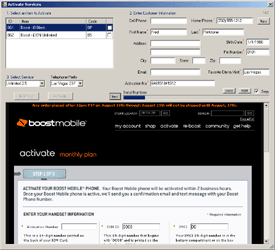
SysCon Activation ScreenOnce SysCon displays the Activate dialog for a transaction, the cashier is prompted for any required customer information that was not previously entered in MS POS. SysCon also allows for three additionally defined drop-down boxes and three edit boxes for any item category.

This information along with the customer information is then used to automatically populate the defined series of web pages. Any information displayed on the subsequent web pages can then be automatically stored in the MS POS database or printed to either the report or receipt printers defined in MS POS.

The entire process only takes the cashier a matter of seconds regardless of how complicated the process.
Download Download Info Buy Now

       Home | Products | Contact Us

Copyright © 2006-09 deepC Systems Inc.
All rights reserved.